
In depth
How to track residents' attendance with badges and fingerprints
A terminal linked to Immigreer recognises the resident by smart card, fingerprint or both. Each access is recorded immediately and flows into the cloud software. From there you generate the attendance file to attach to the submission, with no hand-signed sheets.
How electronic attendance tracking works
Without an electronic system, attendance sheets have to be downloaded, printed and signed by hand by residents every day. It is repetitive work that produces paper to file and copy out.
With tracking linked to Immigreer, this step changes. The terminal captures the resident's access and sends it to the portal. Attendance comes from the reader, not from a signature on paper.
In short, the flow is as follows:
- Recognition: the resident presents themselves at the terminal with their smart card, their fingerprint or both.
- Recording: each access event is recorded the moment it happens.
- Monitoring: the event appears immediately on a real-time dashboard that staff can consult.
- Reporting: the data collected flows into the cloud software, which produces the attendance file.
The result is fully digital reporting. Staff no longer have to collect signatures or transcribe lists. Attendance records are accurate and also useful for security and the day-to-day running of the facility.
The system is described in detail on the page about attendance tracking with badges and fingerprints.
Which devices are used: terminal, smart card and tablet
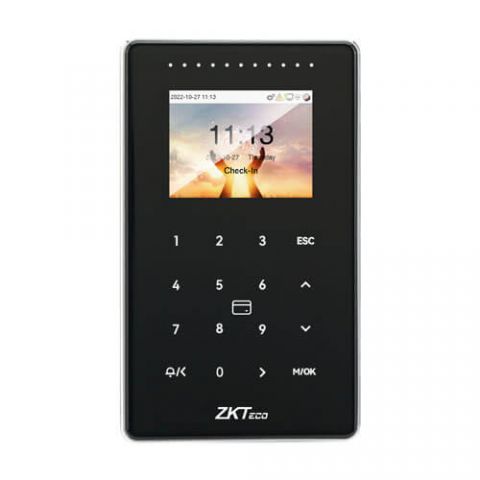
Tracking relies on a few components, each with a specific role.
- The tracking terminal: captures access via smart card, fingerprints or both. Immigreer's badge and attendance control units are designed in-house by Codebase Srl, which specialises in IT and electronics.
- The Mifare smart card: each card is programmed with a unique ID, protected by Mifare encryption. It is the resident's personal badge.
- The door-release relay: on successful recognition, the system can activate a relay that opens the door for a preset interval. Tracking is thus integrated with access control.
Alongside the readers there is another option: tablet and graphometric signature. An Android app collects the resident's signature for attendance, deliveries of personal items and pocket money. The signed PDF reports can be viewed from a PC.
The two solutions meet different needs. The reader is suited to recording arrivals and departures continuously. The tablet is useful when a resident's signature is needed on a specific document, such as a delivery.
The full set of tools for residents and services is described in the Immigreer features.
Where the fingerprint goes: biometric data stay with the resident
The use of fingerprints raises a legitimate question: where are they stored? In the system linked to Immigreer the answer is clear.
Biometric data remain on the resident's smart card, not in a central archive. The fingerprint is stored on the card the resident carries. This choice reduces the risk of unauthorised access or improper disclosure of data.
At the terminal, the resident can record attendance in two ways:
- with the smart card alone;
- directly with their fingerprint.
The two methods make the check more flexible and robust.
From a regulatory standpoint, the capture and management of fingerprints comply with Italian Data Protection Authority (Garante Privacy) decision no. 513 of 12 November 2014 on biometrics and with the GDPR. Tracking with card plus fingerprint is stated to comply with Regulation (EU) 2016/679 and the Italian Privacy Code (Legislative Decree 196/2003).
The software provides a compliant tool. The managing organisation's own obligations as data controller, such as informing residents, remain its responsibility: it is advisable to address them with its data protection officer.
From the reader to the file for the Prefecture
Electronic tracking is not an end in itself. It serves to make submitting attendance simpler.
The Minniti Decree of 17/08/2017 requires centres to report attendance and flows to the Prefecture. With paper sheets, every submission requires signatures collected by hand and documents to sort.
With Immigreer the process is cut down to three steps:
- Track attendance: the resident records their attendance with a badge or fingerprint.
- Immigreer generates the file: the data collected flows into the cloud software, which produces the attendance file, already in the format required by the SUA.
- Attach the file and submit: you attach the file generated by Immigreer to the submission, instead of hand-signed sheets.
Submission procedures may vary from area to area: check your Prefecture's instructions on the formats and deadlines required.
For the full picture of obligations, including notices to residents, see the page on Minniti Decree compliance.
What the Prefecture sees and how attendance data are protected
Attendance recorded by the readers does not stay locked inside the centre. Immigreer is also designed for Prefectures.
Managing organisations enter residents, attendance and services as part of their everyday work. The Prefecture can consult the data of the centres in its area directly in the software and monitor attendance, without requesting sheets or files. Requests to organisations, with replies and attachments, remain traceable and available to both parties. Further details on the Immigreer for Prefectures page.
When it comes to data protection, a few elements are relevant:
- Data separation: each company and each centre sees only its own data; visibility is granted explicitly.
- Tracked access: access protected with an optional second factor and every operation logged, with who, what and when.
- Certifications: Codebase Srl, which develops Immigreer, is certified to ISO 9001, ISO/IEC 27001, ISO/IEC 27017 and ISO/IEC 27018. The last two concern cloud services and the protection of personal data processed on behalf of customers.
Certificates are sent to the organisation on request. Find out more on the ISO certifications page.
Frequently asked questions about badge and fingerprint tracking
Does the resident have to use their fingerprint?
No. The terminal captures access via smart card, fingerprint or both. The resident can record attendance with the card alone or directly with their fingerprint.
Are residents' fingerprints stored in a central database?
No. Biometric data remain on the resident's smart card, not in a central archive. This reduces the risk of unauthorised access or improper disclosure.
Are hand-signed attendance sheets still needed?
With electronic tracking, attendance comes from the reader. The file generated by Immigreer is attached to the submission. For submission details, check your Prefecture's instructions.
Can the resident's signature be collected without a reader?
Yes, with a tablet and graphometric signature. An Android app collects the signature for attendance, deliveries of personal items and pocket money, and the signed PDF reports can be viewed from a PC.
Who makes the readers linked to Immigreer?
Immigreer's badge and attendance control units are designed in-house by Codebase Srl, the company that develops the software, active in IT and electronics for 15 years.
See the readers in action at your centre
In a no-obligation demo we will show you badge and fingerprint tracking linked to your centre and the file ready to attach.
Request a free demo Attendance tracking with badges and fingerprints
Updated on